概述
记录爬取scu教务处的事项。
模拟登陆
使用requests.session()保存爬虫状态
首先需要进行登录:
前往登录界面,F12打开network,输入错误的登录信息可以查看网络请求记录。
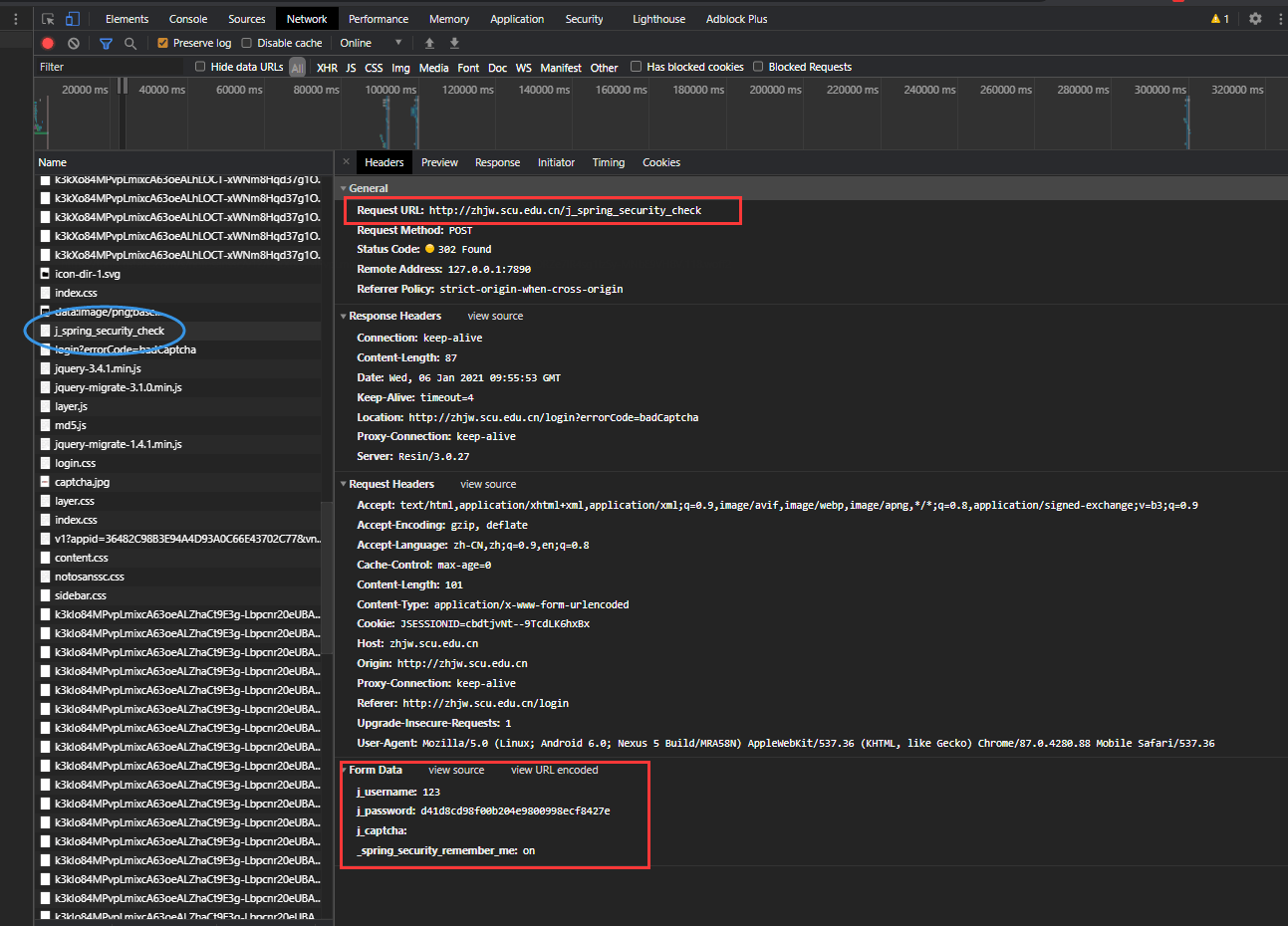
真正有用的登录请求信息已经标出。
只需要对照着General中的Request Method(POST)、Request Headers和Form Data
使用requests.session进行请求即可。
注意
Form Data中的_spring_security_remember_me参数是装了基兄的scu插件才能看到,加上这个参数可以增加session的保存时间,不需要每次爬取信息都要登录一遍。Form Data中的j_password不是明文密码,而是MD5加密后的密码。Request Headers一定要打对,Cookie参数可以忽略。- 验证码可以先用
GET方法获取,再POST登陆。
爬取姓名&头像
爬取课表
参考代码
import requests
import re
import hashlib
from lxml import etree
from PIL import Image
from io import BytesIO

class JWCSpider():
    def __init__(self, username, password):
        self.username = username
        self.password = self.__md5preFix(password)
        self.session = requests.session()
        self.headers = {
            'Accept': 'text/html,application/xhtml+xml,application/xml;q=0.9,image/avif,image/webp,image/apng,*/*;q=0.8,application/signed-exchange;v=b3;q=0.9',
            'Accept-Encoding': 'gzip, deflate',
            'Accept-Language': 'zh-CN,zh;q=0.9,en;q=0.8',
            'Connection': 'keep-alive',
            'Host': 'zhjw.scu.edu.cn',
            'Referer': 'http://zhjw.scu.edu.cn/login',
            'Upgrade-Insecure-Requests': '1',
            'User-Agent': 'Mozilla/5.0 (Linux; Android 6.0; Nexus 5 Build/MRA58N) AppleWebKit/537.36 (KHTML, like Gecko) Chrome/87.0.4280.88 Mobile Safari/537.36',
            'Origin':'http://zhjw.scu.edu.cn',
        }

    def __md5preFix(self, password: str) -> str:
        ins_md5 = hashlib.md5()
        ins_md5.update(password.encode('utf-8'))
        return ins_md5.hexdigest()

    def __get_captcha(self):
        url = 'http://zhjw.scu.edu.cn/img/captcha.jpg'
        captcha_img = self.session.get(url).content
        img = Image.open(BytesIO(captcha_img))
        img = img.convert('L')
        img.save('captcha.jpg')
        captcha = str(input('验证码:'))
        return captcha

    def __tofile(self, content: str, filename: str = 'format.html'):
        with open(filename, 'w', encoding='utf-8') as ofile:
            ofile.write(content)

    # 登录教务处
    def login_in(self) -> str:
        url = 'http://zhjw.scu.edu.cn/j_spring_security_check'
        data = {
            'j_username': self.username,
            'j_password': self.password,
            'j_captcha': self.__get_captcha()
        }
        try:
            response = self.session.post(url, data = data, headers=self.headers)
        except ConnectionError:
            return ('error', '网络连接登录错误')
        except TimeoutError:
            return ('error', '访问超时登录错误')

        isError  = re.findall(r'errorCode=', response.content.decode('utf-8'))
        if isError:                             # 判断账号密码是否正确
            return ('error', '账号或者密码错误')
        else:
            return ('ok', '登录成功')

    def get_planCompletion(self):
        url = 'http://zhjw.scu.edu.cn/student/integratedQuery/planCompletion/index'
        # response = self.session.get(url, headers=self.headers)
        self.headers['Accept'] = 'text/html,application/xhtml+xml,application/xml;q=0.9,image/avif,image/webp,image/apng,*/*;q=0.8,application/signed-exchange;v=b3;q=0.9'
        self.headers['Referer'] = 'http://zhjw.scu.edu.cn/student/integratedQuery/course/courseSchdule/index'
        response = self.session.get(url, headers=self.headers)
        # print(re.text)
        self.__tofile(response.text)

    def get_courseTable(self):
        url = 'http://zhjw.scu.edu.cn/student/courseSelect/thisSemesterCurriculum/ajaxStudentSchedule/curr/callback'
        self.headers['Accept'] = '*/*'
        self.headers['Referer'] = 'http://zhjw.scu.edu.cn/student/courseSelect/thisSemesterCurriculum/index'
        self.headers['X-Requested-With'] = 'XMLHttpRequest'
        response = self.session.get(url, headers=self.headers)
        # print(re.text)
        self.__tofile(response.text, "coursetable.json")

    def get_courseSection(self):
        url = "http://zhjw.scu.edu.cn/ajax/getSectionAndTime"
        self.headers["Accept"] = "application/json, text/javascript, */*; q=0.01"
        self.headers["Referer"] = "http://zhjw.scu.edu.cn/student/courseSelect/thisSemesterCurriculum/index"
        self.headers['X-Requested-With'] = 'XMLHttpRequest'
        response = self.session.post(url, headers=self.headers, data={"planNumber":"", "ff": "f"})
        self.__tofile(response.text, "format.json")

    def get_studentPic(self):
        url = 'http://zhjw.scu.edu.cn/main/queryStudent/img?715.0'
        self.headers['Accept'] = 'image/avif,image/webp,image/apng,image/*,*/*;q=0.8'
        self.headers['Referer'] = 'http://zhjw.scu.edu.cn/student/courseSelect/thisSemesterCurriculum/index'
        stdPic = self.session.get(url, headers=self.headers).content
        img = Image.open(BytesIO(stdPic))
        img.save('student.jpg')

    def get_name(self):
        url = 'http://zhjw.scu.edu.cn/student/rollManagement/rollInfo/index'
        self.headers['Accept'] = 'text/html,application/xhtml+xml,application/xml;q=0.9,image/avif,image/webp,image/apng,*/*;q=0.8,application/signed-exchange;v=b3;q=0.9'
        self.headers['Referer'] = 'http://zhjw.scu.edu.cn/'
        response = self.session.get(url, headers=self.headers)
        res = re.findall(r'title=".*的照片', response.content.decode('utf-8'))
        print(res[0][7:].replace('的照片', ''))


def main():
    check = JWCSpider('studentid', 'password')
    print(check.login_in())
    check.get_studentPic()
    check.get_courseSection()

if __name__ == '__main__':
    main()